• Home
  • App SwitchingRoom CalendarTouch RemoteScreen MirroringRoom ControlVCA CloudCost Savings
    All features
  • Download
  • Pricing
  • Help Center
  • Blog
  • Contact Us
Screen Mirroring

Easily project your phone, tablet, or computer screen wirelessly onto a large display

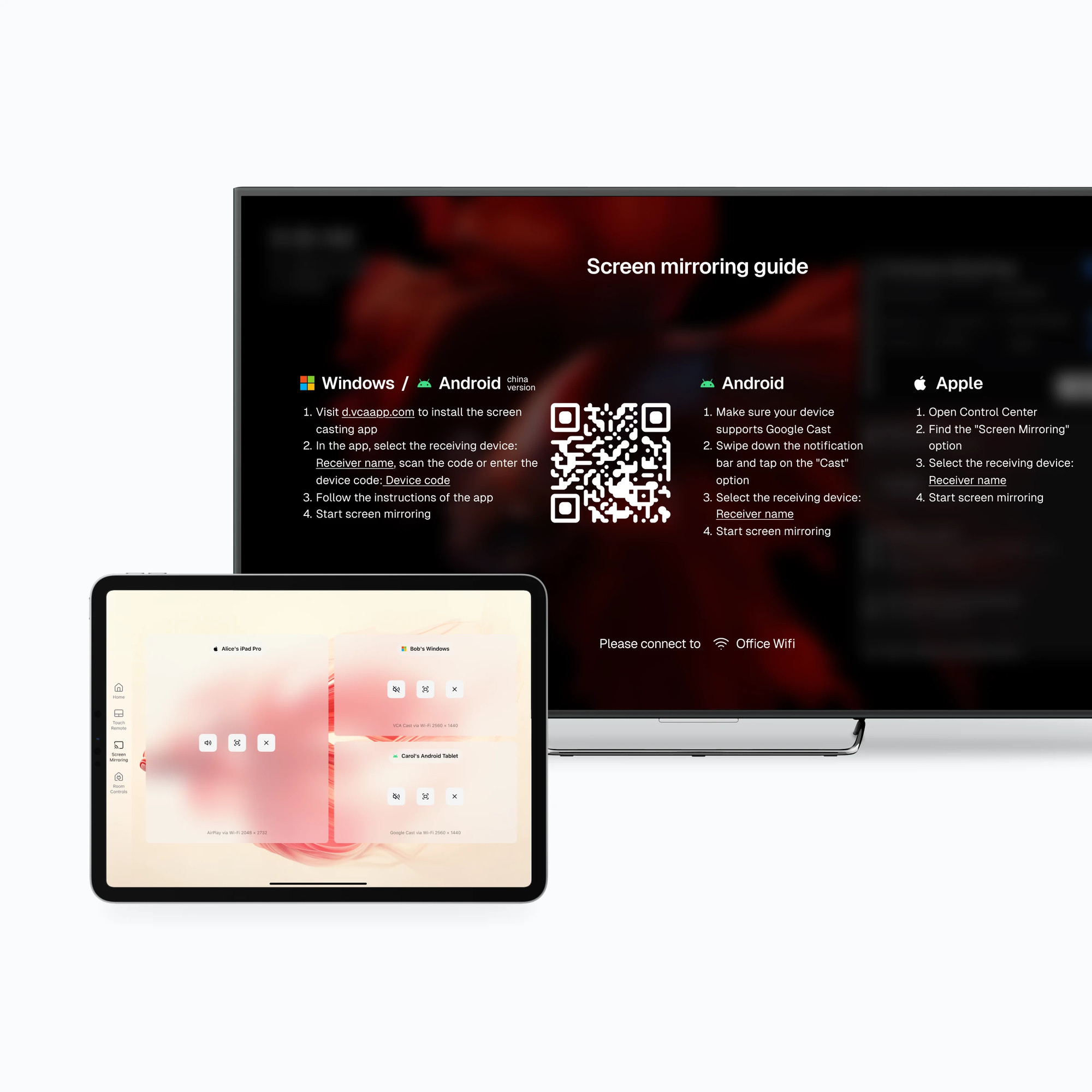
Screen Mirroring gives phones, tablets, and computers practical wireless paths to a meeting room display without making a cable the default workflow.
Download VCAContact Sales
Screen Mirroring feature

What is Screen Mirroring?

Screen Mirroring is a Host capability for presenting a personal-device screen on the meeting room display. The available connection method depends on the sender operating system, the Host configuration, and the room network. It can reduce routine cable handling, while a wired path remains a useful fallback for critical presentations.

One system, seamlessly connecting all video conferencing platforms.

Features

  • All features
  • App Switching
  • Room Calendar
  • Touch Remote
  • Screen Mirroring
  • Room Control
  • VCA Cloud
  • Cost Savings

Download

  • Host
  • Controller

Legal

  • Terms of Service
  • Privacy Policy
  • Open Source License

Product

  • Changelog
  • Roadmap
  • Classic

Newsletter

By submitting, you agree to our Privacy Policy

vcaapp.com © All rights reserved.

京ICP备18058666号-7

DeepLaunchAI Toolz Dir

Made with ❤️ by VCA Team

Verify in product documentation
Screen Mirroring feature

Why choose Screen Mirroring

Modern meetings often require content from personal devices. VCA adds a wireless presentation path while keeping device, network, and fallback requirements visible.

Works with available sender methods

The connection method exposed to a participant depends on the sender operating system, the installed VCA version, and the Host configuration.

Makes wireless sharing the everyday path

Compatible sessions can start without choosing an HDMI or USB adapter first. A wired fallback remains appropriate for critical presentations.

Stays within the room workflow

Participants access presentation from the VCA room experience instead of learning a separate receiver interface. Available transitions depend on the current room configuration.

Screen Mirroring workflow

  1. 01

    Start screen mirroring

    Open the wireless presentation entry on the VCA Controller and follow the connection instructions shown for the current room.

  2. 02

    Connect your personal device

    Use the casting or connection flow available on the phone, tablet, or computer to select the room target.

  3. 03

    Share your screen

    After the connection is confirmed, check the room display and presentation quality before beginning.

  4. 04

    End screen mirroring

    After the meeting, end screen mirroring on the Controller to release the display resources.

Compare options

How Screen Mirroring compares with alternatives

A wired connection is predictable but requires the correct cable or adapter. A dedicated wireless receiver can be useful when screen mirroring is the room's only requirement. VCA places wireless presentation inside the existing Host and Controller workflow, so teams can evaluate it as part of the complete room rather than as a separate user experience.

Common approach
Who it suits
How VCA works
Wired screen mirroring (HDMI/VGA)
Professional presentation scenarios that require high image quality and stable connections.
VCA can reduce routine cable handling, while image quality and latency still depend on the sender, casting method, content, and network.
Standalone wireless display device
Meeting rooms without a meeting system that only need screen mirroring functionality.
VCA keeps presentation access inside the same Host and Controller workflow used for the rest of the room.
Built-in screen mirroring in meeting software
Already joined a meeting platform and need to share the screen during the meeting.
Screen Mirroring can be used outside of meeting platforms, suitable for quick sharing scenarios without joining a meeting.

What affects a wireless presentation

Wireless presentation depends on the sender device, the available casting method, and the room network. Keep a wired fallback for high-stakes presentations.

Protocol availability depends on the device

Apple, Android, Windows, and browser-based senders expose different connection methods and prompts.

Network policy can block discovery

Client isolation, multicast restrictions, firewalls, or separate VLANs may prevent a sender from finding the room receiver.

Quality follows the source and network

Resolution, motion quality, and latency vary with the selected protocol, source device, Wi-Fi conditions, and content.

Prepare the room and sender devices

Use these first-party references to confirm deployment details before making a room decision.

VCA usage scenarios

Read how wireless screen mirroring fits into the VCA room experience.

System requirements

Check Host, Controller, display, and network prerequisites.

Download VCA

Install the current Host and Controller builds before room testing.

Related resources

Continue exploring VCA

Multi-platform switching

Learn how VCA quickly switches between multiple meeting platforms.

Documentation

View detailed Screen Mirroring documentation and usage guides.

Screen Mirroring FAQ

Concise answers to the questions teams ask before planning or deploying this capability.

Make meeting sharing easier

Evaluate a wireless presentation path inside the VCA room workflow, with a wired fallback for the moments that need it.

Download VCAContact Sales