• Home
  • App SwitchingRoom CalendarTouch RemoteScreen MirroringRoom ControlVCA CloudCost Savings
    All features
  • Download
  • Pricing
  • Help Center
  • Blog
  • Contact Us
VCA Cloud

Manage meeting room Hosts, licenses, and room operations from one cloud workspace

VCA Cloud centralizes device and license management for distributed meeting rooms, helping IT teams operate VCA Hosts across locations.
Start free trialContact sales
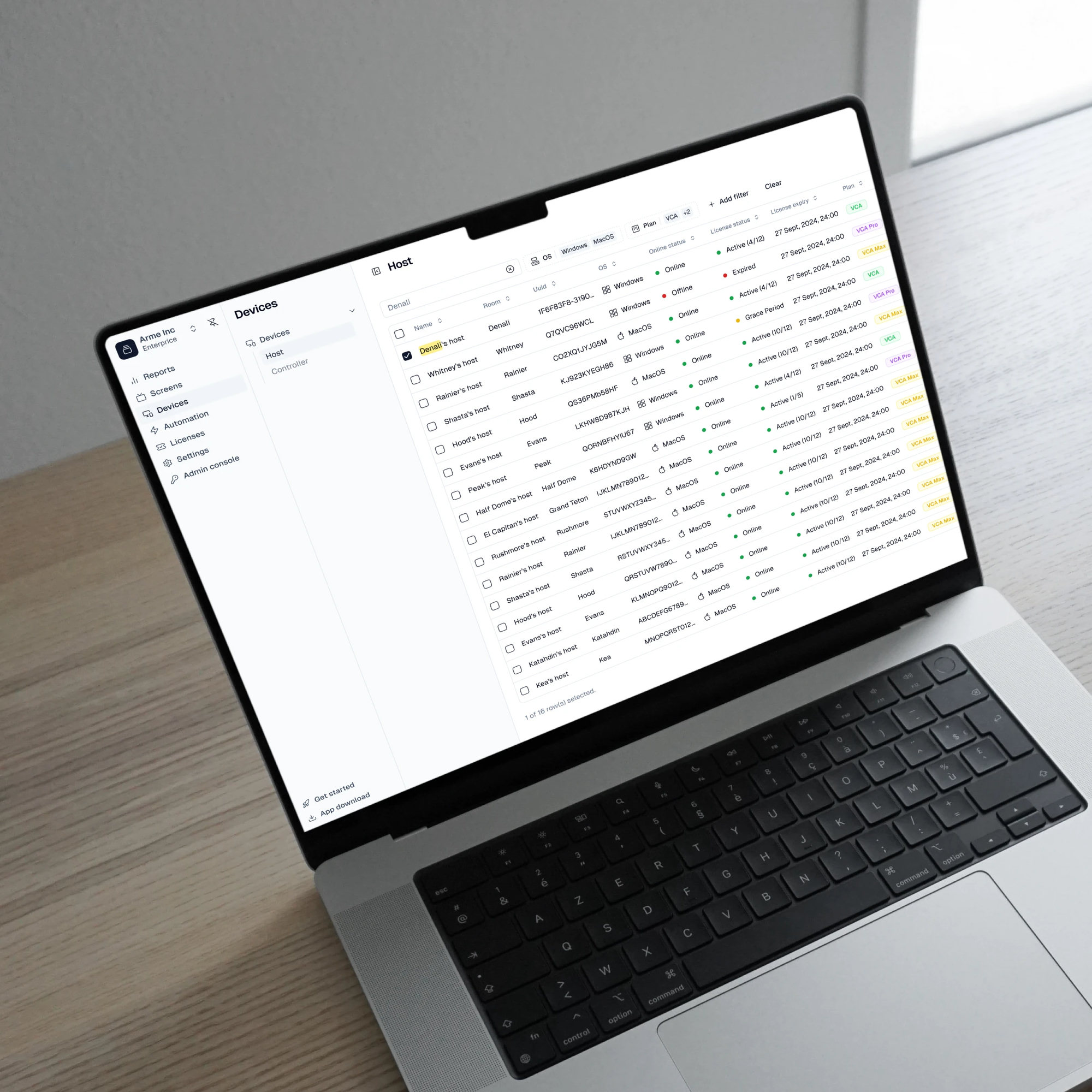
VCA Cloud centralized meeting room management

What is VCA Cloud?

VCA Cloud is the management layer for VCA deployments. It helps teams manage accounts, Host devices, licenses, subscriptions, room calendar bindings, and cloud-connected room operations from one workspace. For organizations with multiple meeting rooms or locations, VCA Cloud gives IT teams a VCA-specific view of device lifecycle and license status instead of relying only on manual room checks or disconnected vendor portals.

One system, seamlessly connecting all video conferencing platforms.

Features

  • All features
  • App Switching
  • Room Calendar
  • Touch Remote
  • Screen Mirroring
  • Room Control
  • VCA Cloud
  • Cost Savings

Download

  • Host
  • Controller

Legal

  • Terms of Service
  • Privacy Policy
  • Open Source License

Product

  • Changelog
  • Roadmap
  • Classic

Newsletter

By submitting, you agree to our Privacy Policy

vcaapp.com © All rights reserved.

京ICP备18058666号-7

DeepLaunchAI Toolz Dir

Made with ❤️ by VCA Team

Verify in product documentation
VCA Cloud

Cloud management for distributed meeting rooms

VCA Cloud matters when room operations become a fleet problem: several Hosts, several rooms, several licenses, and different support workflows.

Host and license context

Teams can connect VCA software usage to Host devices and subscriptions instead of tracking room software manually in spreadsheets.

Calendar and account workflows

Room Calendar setup, cloud account management, and subscription management are part of the broader VCA Cloud operating model.

Built for VCA room lifecycle tasks

The cloud workspace is specific to VCA Hosts and features, making it more relevant than generic remote monitoring for VCA deployments.

VCA Cloud operating flow

  1. 01

    Create a VCA account

    Set up the cloud account that will manage licenses, devices, and room-related services.

  2. 02

    Bind Host devices

    Connect room Hosts to the account so they can be managed and associated with licenses.

  3. 03

    Manage plans and room capabilities

    Assign the right VCA plan based on whether the room needs basic Rooms video conferencing, Pro meeting features, or Max room control.

  4. 04

    Operate rooms over time

    Use cloud context to support distributed rooms, subscriptions, and VCA-specific device lifecycle work.

Compare options

How VCA Cloud compares with manual checks and vendor portals

Manual room inspection can work for a few nearby rooms, and native vendor portals can work when every room belongs to one ecosystem. VCA Cloud is built for VCA-specific operations across Hosts, licenses, room calendars, and subscriptions. It gives teams a single place to manage the VCA deployment rather than piecing together room state from physical checks, spreadsheets, generic monitoring, and separate vendor dashboards.

Common approach
Who it suits
How VCA works
Manual room inspection
Small offices where IT can physically inspect every room and update records by hand.
VCA Cloud gives teams a cloud workspace for Host and license context, reducing dependence on manual checks.
Vendor-specific room portal
A fleet standardized entirely on one native Rooms vendor and its certified devices.
VCA Cloud tracks VCA Host and feature context across multi-platform room deployments.
Generic remote monitoring tool
Broad endpoint monitoring across laptops, servers, or unrelated devices.
VCA Cloud is purpose-built around VCA device lifecycle, licenses, subscriptions, and room feature configuration.

Understand the cloud and local responsibility split

VCA Cloud manages VCA accounts, devices, licenses, and connected services. It does not replace the administration portals of every meeting or hardware vendor.

Cloud-connected workflows require internet access

Account, subscription, license, and Room Calendar administration depend on access to VCA Cloud.

Feature availability follows the plan and release

Confirm the current pricing and product documentation before promising a cloud operation to a deployment team.

Vendor-specific administration remains separate

Use native vendor portals for the accounts, policies, and certified devices owned by those vendors.

Cloud account and service references

Use these first-party references to confirm deployment details before making a room decision.

Trial and subscription

Review trial, account, subscription, license, and activation workflows.

Room Calendar management

See one current cloud-managed room service from provider connection to Host binding.

VCA pricing

Confirm the current plan scope before choosing a deployment tier.

Related resources for cloud operations

Continue exploring VCA

Trial and subscription

Understand VCA account, license, subscription, and trial setup.

Room Calendar

See how calendar authorization and room binding fit into the cloud workflow.

Pricing

Compare VCA, VCA Pro, and VCA Max capability tiers before rollout.

VCA Cloud FAQ

Concise answers to the questions teams ask before planning or deploying this capability.

Manage VCA rooms as a fleet

Use VCA Cloud to keep Host devices, licenses, and room services tied together as your deployment grows.

Start free trialContact sales